

Welcome to PixAI! This FAQ covers common questions about membership subscriptions and credit pack purchases, including payment methods, upgrades/downgrades, billing, receipts, and refunds. If you don’t see your issue here, please contact our Support team at PixAI Feedback.
Payment Methods & Where Charges Come From
Q1. Which payment methods are supported on the Web?
A.Visa, Mastercard, PayPay and Google Pay are supported on the PixAI website.
Q2. Which payment methods are supported in the mobile app?
A. Payments are handled by the App Store (iOS) or Google Play (Android). The store bills you using the payment method set on your Apple or Google account.
Q3. Why do Web and App prices differ?
A. App store platform fees can make App prices slightly higher than Web prices.
Managing Where You Subscribed (Web vs App)
Q4. How do I know where to manage my plan?
A. Manage your plan on the same platform where you originally subscribed:
- Subscribed on Web → Manage on Web.
- Go to your Profile Page.
- Navigate to Membership& Credits Section.
- Click “Manage Auto-Renewal”
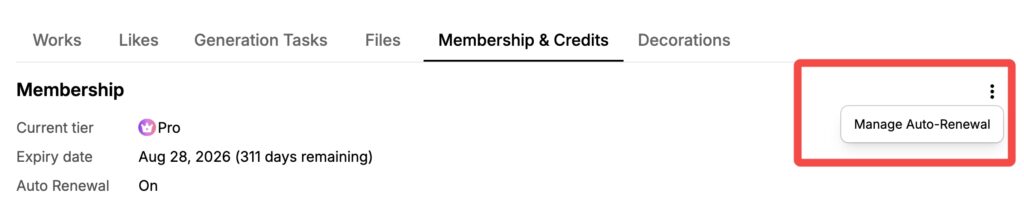
- Subscribed in App (iOS/Android) → Manage in the App/Store.
- Open the App Store (iOS) or Google Play Store (Android).
- Go to Subscriptions.
Q5. I can’t click Upgrade/Downgrade—why?
A. The most common reason is a platform mismatch (e.g., trying to change an App Store subscription on the Web). Switch to the correct platform and try again. If it still fails, contact Support.
Web Subscriptions (Monthly & Annual)
Q6. How do Web monthly upgrades work?
A. You can upgrade anytime. When you upgrade:
- You’re charged the new monthly plan immediately.
- New plan credits are issued right away.
- Your billing date resets to the upgrade date (future renewals occur on that calendar day). Example: Start Start on Jan 1 → upgrade to Plus on Jan 15 → charged Plus on Jan 15, Plus credits issued immediately, next renewal every 15th.
Q7. How do Web annual upgrades work?
A. You can upgrade anytime. You pay only the difference between plans, new plan credits are issued immediately, and your billing date resets to the upgrade date. Also, we now supports renewal before your plan expires.
Additionally, we now support early renewal. You can pay to renew your current annual plan before it expires, and the additional year will be added to the end of your existing subscription period.
Q8. Can I downgrade a Web plan (monthly or annual)?
A.No. Downgrades are not supported on the Web. To move to a lower plan, cancel auto-renew now and re-subscribe to the lower plan after your current term ends.
Q9. Can I change my credit card while Web auto-renew is active?
A.Not directly. Please cancel your current Web subscription first. After it ends, re-subscribe with the new card.
App Subscriptions (iOS / Android)
Q10. On iOS, how do upgrades work?
A. Upgrades take effect immediately.
- Monthly → Annual: Apple refunds the unused portion of the monthly period and charges the full annual fee; your renewal date becomes the upgrade date.
- Lower-tier → Higher-tier (monthly or annual): Apple refunds the unused portion of the lower tier and charges the higher tier; renewal date becomes the upgrade date.
- Apple generally applies proration.
Q11. On iOS, how do downgrades work?
A. Your current plan remains active until the next renewal date. The lower-priced plan starts on that renewal date.
Q12. On Android (Google Play), how do upgrades work?
A. Upgrades take effect immediately. Google Play automatically prorates and adjusts the charges (including Monthly → Annual).
Q13. On Android, how do downgrades work?
A. Downgrades take effect immediately. Google Play prorates based on the remaining time/price difference.
Start, Renewal & Benefits Timing
Q14. When are my monthly membership benefits (credits) issued?
A. On the same calendar day each month as your subscription start date. Example: If you started on the 25th, new monthly credits are issued each 25th.
Q15. I didn’t receive my monthly credits—what should I do?
A. First, confirm the issue date (see Q14). If they still haven’t appeared, contact Support and include your PixAI Profile link, plan, and recent billing date; we’ll verify and issue any missing credits.
Cancelation & Auto-Renew
Q16. How do I cancel auto-renew on the Web?
- Go to your Profile → Membership & Credits.
- Click Manage Auto-Renew and follow the instructions to cancel.
Q17. How do I cancel auto-renew in the App (iOS/Android)?
- iOS: Open App Store → Subscriptions → select PixAI → Cancel.
- Android: Open Google Play → Payments & subscriptions → Subscriptions → select PixAI → Cancel.
Q18. After I cancel, can I still use membership features?
A.Yes. You keep all features until the end of your already-paid term. After that, your account reverts to Free, and no further charges occur.
Billing, Receipts & Invoices
Q19. Do you provide invoices for Web purchases?
A.No. Our Web payment provider does not support invoicing.
Q20. How do I get receipts for App purchases?
A. The App Store or Google Play automatically emails receipts to the email address on your Apple/Google account.
Q21. Can I change my billing date?
A. On the Web, your billing date resets to the upgrade date when you upgrade (see Q6/Q7). Otherwise, billing dates are determined by your original start date or store rules (App).
Credit Packs
Q22. What types of credit packs are available?
- Special Offer Packs:
- One-time $1 offer: Can be purchased once per account.
- Monthly special: Can be purchased once per calendar month.
- Standard Packs:No purchase limit; buy anytime. Note: Discounted packs during promotions are Standard Packs. Special Offer Packs do not go on sale.
Q23. I purchased a credit pack but didn’t receive credits. What should I do?
- Check your receipt or order history to confirm payment succeeded.
- If payment succeeded and credits are missing, contact Support and provide:
- Order screenshot, and
- Order number (iOS usually starts with “M”; Google Play usually starts with “GPA.”). We’ll verify and re-issue credits if needed.
Q24. Do credits expire?
A.No. Credits you purchase or receive do not expire.
Errors & Troubleshooting Payments
Q25. My payment failed—what can I try?
- Re-enter card details (number, expiry, CVC) and try again.
- Contact your card issuer to check for limits/holds.
- Try a different card (credit or debit).
- If you see a high-risk or security-related error, it may be triggered by our payment provider’s protection rules. Switching to another bank card or purchasing through the App often resolves it.
Q26. I upgraded but don’t see new credits. What now?
A. Credits are usually issued immediately on upgrade. If they’re missing, sign out/in and check again. Still not there? Contact Support with your account email, upgrade time, and plan names (from → to).
Account, Transferability & Plan Changes
Q27. Can I transfer my membership or credits to another account?
A.No. Membership and credits are bound to the purchasing account and are not transferable or shareable.
Q28. Can I pause my subscription?
A. Pausing isn’t currently supported. You can cancel auto-renew and re-subscribe later.
Refund Policy
Q29. Do you offer refunds?
A. As a rule, no refunds are offered once payment is completed, per the PixAI Terms of Service. We understand this may not match every expectation, and we appreciate your understanding.
Contact & Supports
Q30. I still need help—how do I contact Support?
A. Please contact PixAI Support and include:
- Your PixAI profile link,
- Your platform (Web/iOS/Android),
- Plan name and billing date,
- Screenshots of errors or receipts, and
- Order numbers (for App: iOS typically starts with “M”; Android with “GPA.”). This helps us resolve your issue quickly.