Iscrizione PixAI
PixAI
PixAI
Generate
Sign in
Home
Generazione
Modelli
Recipe
NEW
Studio
Contest
Mio.2

Creazione via chat

AI Tools
Guide

User LoRA

SD

Fashion Magazine - Style

HomeModelliMio.2Profilo

Strumenti IA

  • OC Maker
  • AI Anime Generator
  • VTuber Maker
  • Sonic OC Maker
  • Hazbin Hotel OC Maker
  • Anime Character Creator
  • AI Figure Generator
  • Genshin OC Maker
  • All AI Tools

Scopri

  • Trending Tags
  • Classifica
  • Market dei modelli
  • Contest
  • Notizia

Informazioni

  • Informazioni su PixAI
  • Guide
  • Come utilizzare PixAI
  • Tsubaki.2
  • Scopri Mio
  • Regole sui contenuti

Prezzi e assistenza

  • Appartenenza
  • Pacchetti di crediti
  • Contatto

App mobile

  • Scarica l'app PixAI
  • App Store
  • Google Play
© 2026 PixAI
  • Termini di servizio
  • Informativa sulla privacy
  • Politica sul copyright
  • Attributions
  • Legge sulle transazioni commerciali specificate
Fashion Magazine - Style - AI Model cover image
Caricato su
20 apr 2023, 04:22
Utilizzi
117k
Reviews
Excellent  (8)
Parole d'ordine

LoRA quotes <lora:xxxxx>

Permessi
  • Allow image generation & sharing
  • Permettete agli utenti di scaricare il vostro modello
  • Usi commerciali

Recommended LoRAs

Rinko Kobayakawa - AI Model cover image

User LoRA

Rinko Kobayakawa
2
Dangerous Beast (Illya Version) - AI Model cover image

User LoRA

Dangerous Beast (Illya Version)
92
style xl - AI Model cover image

User LoRA

style xl
1
フレン・E・ルスタリオ(共通衣装)/Furen.E.Lustario(nijisanji idol uniform) - AI Model cover image

User LoRA

フレン・E・ルスタリオ(共通衣装)/Furen.E.Lustario(nijisanji idol uniform)
8

Descrizione

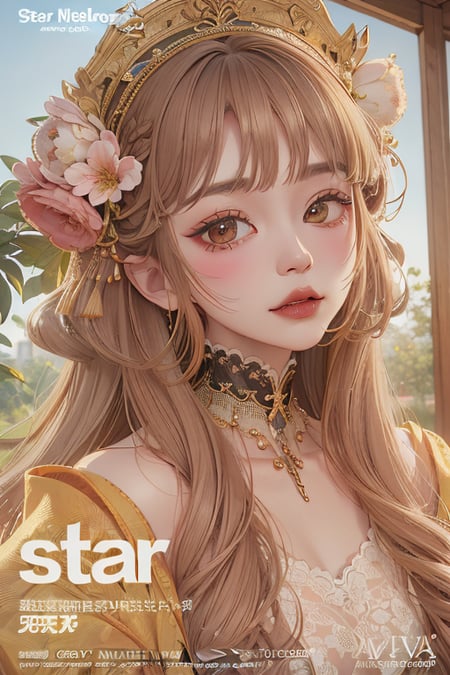
Similar to the style of fashion photography magazines, LoRA is recommended to be used with realistic or 3D style checkpoints, but the quadratic dimension can also have a more consistent effect.

Training use: v1.5-pruned-bakedVAE, resolution 512*768 (2:3 format).

A LoRA that can create fashion photography magazine cover. It is recommended to use it on realistic / 3D checkpoints. The model used for training is v1.5-pruned-bakedVAE with a resolution of 512*768 (2:3 aspect ratio).

Photography Guide | How to properly use this This is a normal LoRA that does not require a LoCON plugin to use.

Magazine cover-like text is added to the frame, and it can respond to accessory-related cues to draw complex, exaggerated hair accessories, necklaces, earrings and other elements.

It's a normal LoRA (not LyCORIS). Good at: generating complex hear accessories / necklace / chocker / earrings / etc. However you must prompt with corresponding words.

Read below info carefully. Because this LoRA isn't perfect yet, sot extra steps are needed to get high quality images.

  1. Prompt | Prompts Add the following prompt to the prompt (🔸 must be | 🔹 Optional):

The prompts(🔸mandatory kinda | 🔹optional):

🔸LoRA quotes /lora:xxxxx

🔹FashionMagCover

🔹magazine cover

🔹english text, watermark, artist name, signature

  1. Advanced usage | Advanced Usage If you don't need text, or need to blend it into a large model via SuperMerger, use the LoRA Block Weight plugin and adjust it with reference to the layer weight effects of the last three example graphs.

For ordinary users, text can be avoided as much as possible by using a LoRA weight of 0.7-0.9 and adding words such as "english text, watermark, artist name, signature" to the negative prompt.

I made this into normal LoRA becasuse LoHA is not well supported by LBW extension. If you want to merge this into checkpoints, please use LoRA Block Weight extension, and refer the the last three xyz plot images for block weight guide.

For lazy person, the LBW preset for this LoRA:

MAGCOVER:1,0.9,0.9,0.9,0.9,0.2,0.8,0.9,0.9,0.8,0.8,0.9,0.9,0.4,0.9,0.9,0.9

Commenti3