สมาชิก PixAI
PixAI
PixAI
Generate
Sign in
หน้าหลัก
สร้าง
โมเดล
Studio
NEW
ประกวด
สร้างด้วย Mio.2
กล่องเครื่องมือ
NEW
Guide

User LoRA

SD

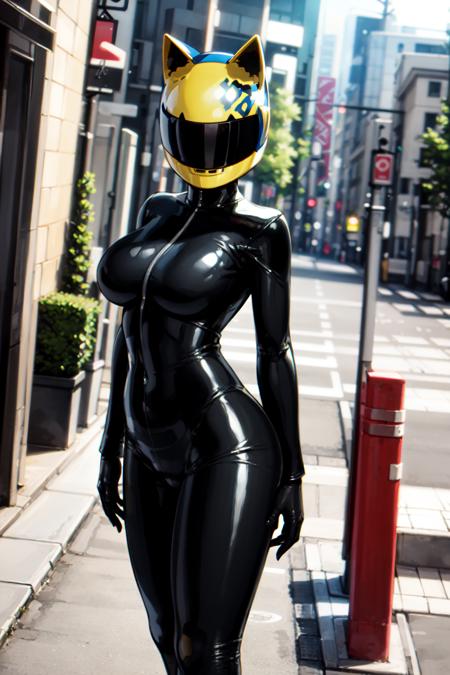
Celty Sturluson - Durarara!!

#Bodysuit#Helmet#Celty Sturluson
เครื่องมือ AI
  • เครื่องมือสร้างอนิเมะด้วย AI
  • เครื่องมือสร้างฟิกเกอร์อนิเมะ
  • เครื่องมือสร้างชีทตัวละคร
  • เครื่องมือสร้างปกนิตยสาร
  • เครื่องมือสร้างตุ๊กตาสำลี
  • เครื่องมือสร้างรูปปั้นยักษ์

สำรวจ

  • แท็กที่กำลังได้รับความนิยม
  • อันดับ
  • ตลาดโมเดล
  • ประกวด
  • ข่าว

เกี่ยวกับ

  • Guide
  • วิธีใช้ PixAI
  • Tsubaki.2
  • รู้จักกับ Mio
  • กฎเนื้อหา

ราคาและความช่วยเหลือ

  • สมาชิก
  • แพ็กเครดิต
  • ติดต่อ

แอปมือถือ

  • ดาวน์โหลดแอป PixAI
  • App Store
  • กูเกิล เพลย์
© 2026 PixAI
  • ข้อกำหนดในการให้บริการ
  • นโยบายความเป็นส่วนตัว
  • นโยบายลิขสิทธิ์
  • Attributions
  • กฎหมายว่าด้วยธุรกรรมทางการค้าเฉพาะ
Celty Sturluson - Durarara!! - AI Model cover image
อัปโหลดเมื่อ
12 มี.ค. 2567 15:42
การใช้งาน
857
รีวิว
ยังไม่มีรีวิว
คีย์เวิร์ด

celty

สิทธิ์
  • Allow image generation & sharing
  • อนุญาตให้ผู้ใช้ดาวน์โหลดโมเดลของคุณ
  • เชิงพาณิชย์

คำอธิบาย

Celty Sturluson from the anime Durarara!! - Full disclosure, I've never seen this anime, but I loved her design, and... here we are!This is a lora trained on 87 hand picked images (and 1 gif by accident lol) of Celty from Durarara!! It was exclusively trained on digital art, no 3d content. It gets the helmet pretty good along with her suit, mostly because her design is pretty simple besides the helmet. It was trained on danbooru-style tags, so use those when trying to prompt - I've included the tags in a .txt file in the "Training Images" download below.It works pretty well with most ckpts, but I recommend Anything 4.5, I used it for most of the example images.NOTES:-The helmet could be removed if you prompt no helmet and define the facial features, and lower the weight... But why would you do that?!-It will still have issues generating vehicles/motorbikes, but it can still kind of work on some models if you're lucky-It can generate a "male" version of this character with the right promptingExample prompt: (See example images, all images should still have their metadata. Just drag the images onto the PNG info tab and import it.)

คอมเมนต์1