

AI generation tasks on PixAI may occasionally take longer than expected. Generation time can vary depending on system demand and the computational requirements of each task.
This article explains:
- Why generation delays happen
- What occurs when a task runs for too long
- How automatic cancellation and credit refunds work
Why AI Generation Tasks May Be Delayed
PixAI processes a large number of AI generation tasks using shared GPU resources. Delays are usually caused by one or more of the following factors:
- High System Demand
During peak usage periods or special events, a high volume of generation requests may enter the queue at the same time. This can result in longer waiting times before tasks begin or complete.
- High Computational Load
Some generation tasks require significantly more computing resources, such as high-resolution outputs, complex prompts, or advanced workflows. These tasks may take longer to process than standard generations.
- Planned Maintenance and System Updates
From time to time, we may perform scheduled maintenance or deploy system updates to improve stability and performance. During these periods, generation queues may slow down temporarily. When maintenance is planned, we will publish an advance notice.
Automatic Cancellation and Refund Policy
To prevent generation tasks from running indefinitely, PixAI applies the following safeguards:
Generation Time Limit
If an AI generation task does not complete within 3 days, it will be automatically canceled by the system.
Credit Refunds
When a task is canceled due to exceeding the time limit:
- All credits used for that task are refunded to your account
- Refund records can be found in your Credit Log using the “Failed Task Refund” filter
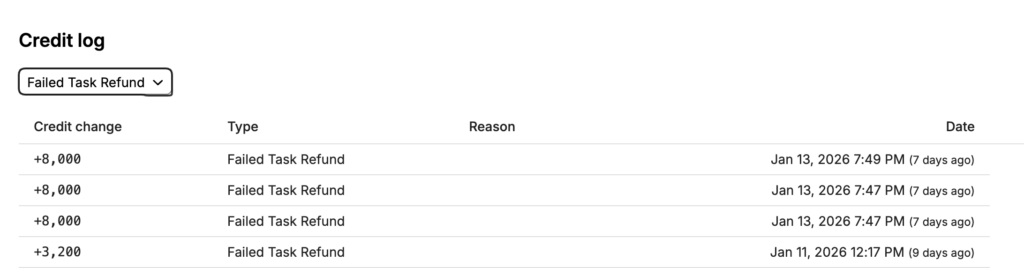
This ensures that credits are not lost due to prolonged processing times.
Tips for Managing Delays
While some delays depend on overall system load, the following practices may help improve your experience:
- Submit tasks during off-peak hours Generation queues are typically shorter during lower-traffic periods.
- Use with confidence If a task exceeds the allowed processing window, the system will automatically cancel it and return the credits.
- Monitor task status If your task is still not canceled after 3 days, please contact our Support team via the Feedback page so we can help check it.